

Samsung has rolled out a major update to its SmartThings platform, introducing SmartThings Now as the centerpiece of a redesigned Home tab UI, which is basically transplanted from its smartphone’s “Now Bar” feature. The update also brings context-aware controls, a refreshed app layout, and expanded local control capabilities.
SmartThings Now Brings Personalized Cards

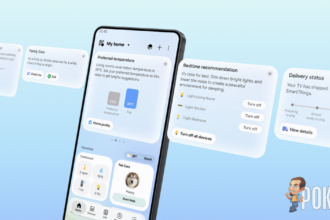
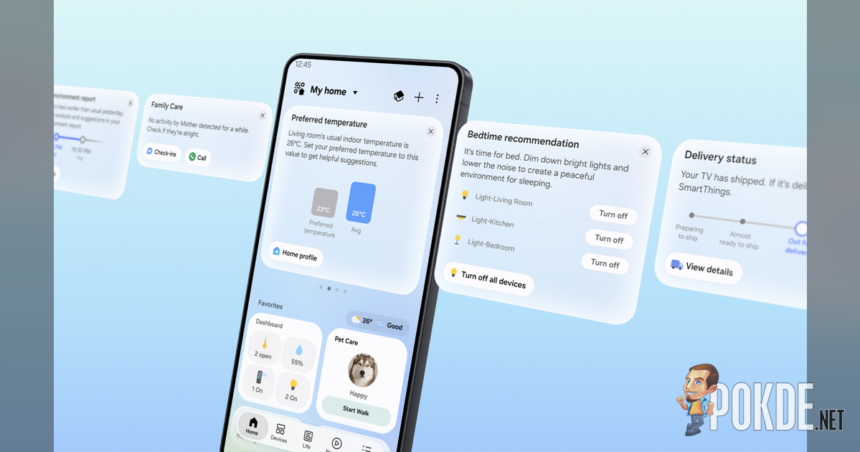
SmartThings Now appears as a set of cards at the top of the Home tab, building on the existing Home Insight feature. It combines relevant information with immediately actionable controls based on the user’s current situation and usage history, rather than requiring users to manually navigate to features.
For example: for Family Care users, if an older family member shows no device activity for an extended period, SmartThings Now presents a care card to the caregiver with options to check in or call. When a user approaches a pre-registered home location, the platform suggests turning on lights and air purifiers in advance, and then prompts the user to create a routine so those actions run automatically in future.
SmartThings Now also analyzes the past week of usage activity to suggest updates to Home tab Favorites. It may recommend removing an air conditioner card as usage declines in cooler months, or adding an AirDresser card when that appliance sees more frequent use during a seasonal change. A Routine Insight card lets users review and delete automations they no longer need, based on a detailed view of the past week’s routine activity.

The broader Home tab layout has also been reorganized. Dashboards, device cards, and service cards are now displayed in formats optimized for easier browsing, Service cards use a more compact design to show more services on a single screen, while Live Wallpaper shifts naturally throughout the day as an extra bit of eye candy. A new Floating Bar places frequently used features at the bottom of the screen, improving one-handed use on larger smartphones.
Support For Local Control & Matter 1.6
SmartThings also gets expanded local control capabilities, allowing a smartphone to communicate directly with a SmartThings Hub when both are on the same Wi-Fi network, rather than routing commands through the cloud. Samsung says this can improve response times by approximately 30% compared to cloud-based control, and helps keep connected devices operational during temporary network disruptions.
SmartThings automatically switches between local and cloud-based control depending on whether the user’s device is at home or away. The updated Offline Device Diagnostics page allows users to push new network information to all registered devices at once, simplifying the process of restoring devices that have gone offline.


Samsung has additionally added support for Matter 1.6, the latest smart home connectivity standard from the Connectivity Standards Alliance, which improves stability and Group Control performance. The update also introduces compatibility with four new device categories: Energy Meters for real-time power monitoring, Closures for specialized door and gate types, Irrigation devices such as sprinkler systems, and Soil Sensors for measuring ground conditions.
Pokdepinion: It took IoT makers this long to finally realize relying on cloud is not always be the best answer after all.