
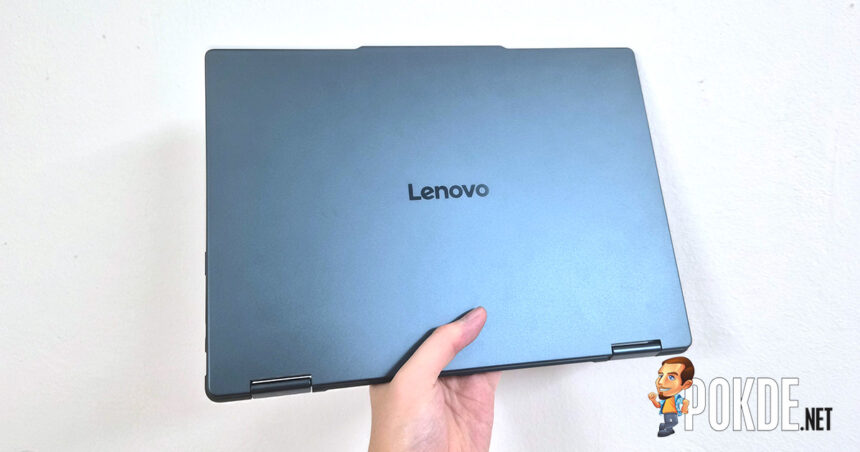

Product Name: Yoga 7a 2-in-1 (14-inch, Gen 11)
Brand: Lenovo
Offer price: 5399
Currency: MYR
-
Appearance - 7.5/107.5/10
-
Efficiency - 8.5/108.5/10
-
Features - 8/108/10
-
Materials - 8/108/10
-
Performance - 7.5/107.5/10
-
Portability - 7.5/107.5/10
-
User Experience (UX) - 8/108/10
-
Value - 8/108/10
Summary
In periods where laptop pricing has shot through the roof due to memory shortage situation, the Lenovo Yoga 7a 2-in-1 (Gen 11) offers a decent machine that still ticks the right boxes without going too overboard on pricing.
Overall
7.9/10Pros
+ Quiet fans
+ Decent pair of speakers
+ Great battery life
+ Included Yoga Pen
+ Solid value
Cons
– Weak GPU performance
– Display is 60Hz only
– No USB4 support
Unboxing


We have a new Lenovo laptop to unbox, in this case the new eleventh generation Yoga 7a 2-in-1 laptop in 14-inch form factor. You’re greeted with a lot of recyclable materials inside, with no signs of plastics and foams to be found – that is to say, pretty standard packaging by Lenovo’s standards.

Here are all of the items we got, and there’s a lot of them. (What you get may differ depending on the optional accessories.) The list includes:
– Quick start guide
– Laptop regulatory information
– Lenovo Services leaflet
– 65W USB-C charger (Type G, UK/MY/SG)
– Lenovo Yoga Pen (+pouch)
– Lenovo Yoga 7a 2-in-1 Gen 11 14″ (14AGP11) main unit
Walkaround


While a lot of Yoga variants exists out there, the current generation of Lenovo Yoga laptops largely share the same look – this Yoga 7a 2-in-1 has even got a very similar shade of blue paint on the chassis as the Yoga Book 9i Gen 10 we previously reviewed. Opening up the unassuming-looking lid reveals a 14-inch glossy OLED touchscreen with FHD+ resolution and the colors you’d expect out of such panel types, but only at 60Hz refresh rate.
Above the display you’ll find an assortment of sensors accompanying the 5MP webcam (with a mechanical shutter) for teleconferencing and Windows Hello duties, though all of these is hidden behind the same glass that protects the OLED display, so you won’t find the microphones here. Instead, the mics are located down at the keyboard side, as seen above.


The keyboard features white LED backlighting with adjustable brightness levels, while the touchpad is moderately-sized as far as 14-inch laptops go. Do note that the chassis in general get smudged fairly easily though, so a piece of microfiber cloth might be something you want to have on the side if you care about its looks.


Under the laptop, there’s a generous amount of area for fresh air to enter the cooling system, though based on the image above we believe this is merely a single-fan design taking care of the AMD Ryzen AI 7 445 processor. There’s also a pinhole for Lenovo OneKey Recovery, which provides a quick way to reset the system if needed. Also, the laptop’s display side protrudes slightly over the keyboard side to allow for easy opening, unlike the recessed design found in various laptops.




Some side-profile views: as we mentioned earlier, there’s only a single fan taking care of the cooling, though the rear of the laptop has been cosmetically altered to feature a symmetrical exhaust design. That said, the entire grille is still functional even if airflow is focused on a very small portion of that. As a 2-in-1 laptop, the hinge design is a standard double-pivot hinge that allows the display to open in any chosen angle.


For its I/O, the Lenovo Yoga 7a 2-in-1 has a HDMI 2.1 (TMDS) port good for 4K60 outputs, along with one USB-C 10Gbps output on both sides of the laptop – bonus points for allowing charging cables to plug in either sides. There’s also a headphone jack on the left, a USB-A 5Gbps port on the right, and a microSD card slot. Next to it is the laptop’s power button with embedded indicator, whereas the LED on the left side indicates charging/battery status.
Specifications
Lenovo Yoga 7a 2-in-1 Gen 11 14-inch (14AGP11)
Full specifications available in product webpage.
| CPU | AMD Ryzen AI 7 445 4.6GHz / 2C+4c, 12 threads |
| RAM | 24GB LPDDR5X-8000 (onboard, soldered) |
| GPU | Integrated: AMD Radeon 840M (4 RDNA3.5 CUs, 256 ALUs @ 2.9GHz) |
| NPU | AMD XDNA2 NPU (50 TOPS) |
| Storage | KIOXIA EG7 Series 512GB SSD KEG70ZNT512G PCIe 4.0, M.2 2242, QLC |
| Display | Lenovo LEN140WUXGA (LEN88AE) 14″ OLED, glossy touchscreen panel 1920 x 1200 (16:10) 60Hz refresh rate 100% DCI-P3, 10-bit (1.07B colors) 400 nits SDR max brightness Dolby Vision support TÜV Rheinland Low Blue Light certified |
| Keyboard | Single-zone white backlighting |
| Touchpad / Stylus | Precision touchpad Yoga Pen Gen 2 support |
| Audio | 4x 2W stereo speakers Dolby Atmos Support |
| Webcam | 5MP (QHD) IR camera Windows Hello support Mechanical webcam shutter |
| Biometrics | Facial recognition (Windows Hello) |
| I/O | Left: 1x HDMI 2.1 TMDS 1x USB-C 10Gbps 1x 3.5mm combo jack Right: 1x USB-A 5Gbps 1x USB-C 10Gbps 1x microSD card reader |
| Wireless Connectivity | MediaTek MT7925 (Wi-Fi 7) 160MHz tri-band, 2×2 MIMO Bluetooth 5.4 |
| Battery | 70Wh Li-ion |
| Power Supply | 65W USB-C charger 100W USB Power Delivery support |
| Operating System | Windows 11 Home 25H2 |
| Dimensions | 316 x 227 x 15.4 mm |
| Colors | Seashell Tidal Teal [As tested] |
| Weight | 1.38kg |
Performance
Storage

The SSD in this laptop is a Kioxia EG7 series model with 512GB storage capacity, which is on the low side; it’s also one of the QLC-based models that comes with cost benefits for OEMs. That said, performance is solid overall (being on the same ballpark as Samsung’s PM9C1a found in the other Yoga laptop we tested), and we have no complaints.
CPU


The “new” AMD Ryzen AI 7 445 is the lowest-end model branded Ryzen AI 7 in Team Red’s current lineup, and in it you get 2 full size Zen 5 cores along with 4 downsized Zen 5c cores, with clock speeds up to 4.6GHz. Confusingly, the Ryzen AI 5 340 from the previous generation is actually the more powerful version of the 6-core model despite segmented below the Ryzen AI 7 chip, having 3+3 cores and 4.8GHz boost clock on the exact same architecture.
Either way, the result of 2+4 cores combined gives the laptop somewhat weak performance across some of the premium segment laptops we’ve tested, only barely outperforming the Intel Core Ultra 7 258V (with 4P+4LPE cores) in multi-core and lagged behind in single-core. Considering the price segment it’s going for, we think it’s still a decent showing for the Lenovo laptop.
GPU


The Ryzen AI 400 series continues to stick to Radeon 800M series graphics, and in this case the Radeon 840M is not doing too great in terms of GPU performance. It’s considerably slower than the Radeon 780M found in Ryzen 7000 series processors (released 3 years ago), so don’t expect much if you managed to get AAA titles running in the first place.
System

For NovaBench, the component scores shows both GPU scores in particular lagging behind all other laptops in this benchmark, while CPU is also on the lower end of this spectrum. Overall, the Lenovo Yoga laptop is sandwiched in between high-end models with the likes of MSI Prestige 14 Flip AI+ and ASUS Zenbook S 14 featuring Intel’s new Panther Lake CPU, and the cheaper ones like Acer Swift 14 AI released last year.

Similarly, the mid-range silicon puts the Yoga 7a 2-in-1 at the bottom half of this chart, though we do see Productivity scores in particular being significantly better than others (short for the Core Ultra 9 386H on the Zenbook we mentioned earlier, being one of the most recent laptop we reviewed). Perhaps Windows 11’s recent updates also contributed to what looks to be general performance boost across the board?
Battery


Despite the relatively middling performance of the Ryzen AI 7 445 when compared against other silicon in this chart, battery life is one area where the Ryzen chip still remains competitive – roughly 15 hours on Procyon video playback test, and up to 20 hours on PCMark 10 if you’re hypermiling it. Very respectable numbers, all things considered.
The Good

While the performance aspects of AMD Ryzen AI 7 445 is nothing to write home about, one thing we do like is the power efficiency and battery life it provides. The Yoga 7a 2-in-1 in this case can stretch almost 20 hours of battery life out of single charge, and that’s despite the chipmaker not updating much on its architecture (which is still based on Ryzen AI 300 series launched last year) and still managed to be competitive against the likes of Intel Lunar Lake or even Panther Lake.
In practical use, the fan noise are generally non-intrusive unless you explicitly switch to Performance mode, and the single-fan setup is sufficient to keep the lone silicon cool in this chassis. Note that when the laptop is switched to tablet or tent mode, the fan deliberately ramps down so you pretty much won’t hear it in normal use. We also appreciate the decent-sounding speakers, where a bit of tuning via Dolby app can further improve its quality; the inclusion of Yoga Pen is also a big plus given that this laptop is touchscreen-capable.
The Bad

There are some significant omissions to take note on this laptop, however. For one, while I don’t mind having just Full HD resolution on a laptop in general, having just 60Hz refresh rate is not exactly a great experience for a laptop circa 2026. Most laptops already have 120Hz as standard, so I’m hoping Lenovo can make high refresh rate standard on such models next time around. On a similar note, you also won’t get much framerates out of the onboard Radeon 840M graphics, as tests shown it’s not powerful enough to tackle AAA gaming for the most part.
Another omission that I’d like Lenovo to address on the Yoga 7a 2-in-1 next time is the lack of USB4 support. While it is commendable that the company has designed the motherboard to feature USB-C on both sides (which is a rarity, likely due to engineering complexity or cost reasons), I’d like to see one with USB4 support for high-bandwidth Thunderbolt peripherals to work on this laptop at their intended speeds (and if you’re expecting to pair an eGPU with this, tough luck).
Verdict

While Lenovo’s official website lists the starting price of this Yoga 7a 2-in-1 chassis at RM5,399, we’ve found a matching SKU on Shopee (from Lenovo’s official store) that lists RM4,889 apiece. Considering you get 24GB of RAM from this kind of price, we could forgive some of its shortcomings in terms of performance and features, and considering the memory pricing situation at large, the value is pretty solid here – even if it’s not necessarily going to wow you.

Special thanks to Lenovo Malaysia providing the Yoga 7a 2-in-1 (Gen 11, 14″ AMD) laptop for this review.











![[Updated: Availability] Nothing Headphone (1) Pro Is Officially The Brand's New Flagship Headphones - 139](https://cdn.pokde.net/wp-content/uploads/2026/09/30224032/nothingheadphone1procover-420x280.jpg "[Updated: Availability] Nothing Headphone (1) Pro Is Officially The Brand's New Flagship Headphones - 140")