
- What Is Clever Cleaner?
- Clever Cleaner Features: What Can It Clean?
- Does Clever Cleaner Really Free Up iPhone Storage?
- What Clever Cleaner Can’t Clean
- How to Free Up Storage on iPhone Using Clever Cleaner
- Clever Cleaner Pros and Cons
- Clever Cleaner Vs Other iPhone Cleaners
- Is Clever Cleaner Worth Using?
- FAQ
Your iPhone is almost full. You’ve deleted old photos, but the storage warning remains. Screenshots, near-identical pictures, and oversized videos are easy to accumulate and tedious to sort. iPhone cleaner apps promise to handle that clutter with a few taps.
Clever Cleaner is one of them. But does it actually deliver? For this Clever Cleaner review, we tested its main cleanup features to see how well they identify unwanted media, how easy they are to use, and whether the app genuinely helps manage iPhone storage.
What Is Clever Cleaner?
Clever Cleaner is an iPhone storage cleaner launched in 2025 by CleverFiles, developer of Disk Drill, an established data recovery program for Mac and Windows. It has earned a 4.8/5 rating from more than 80,000 US App Store ratings.
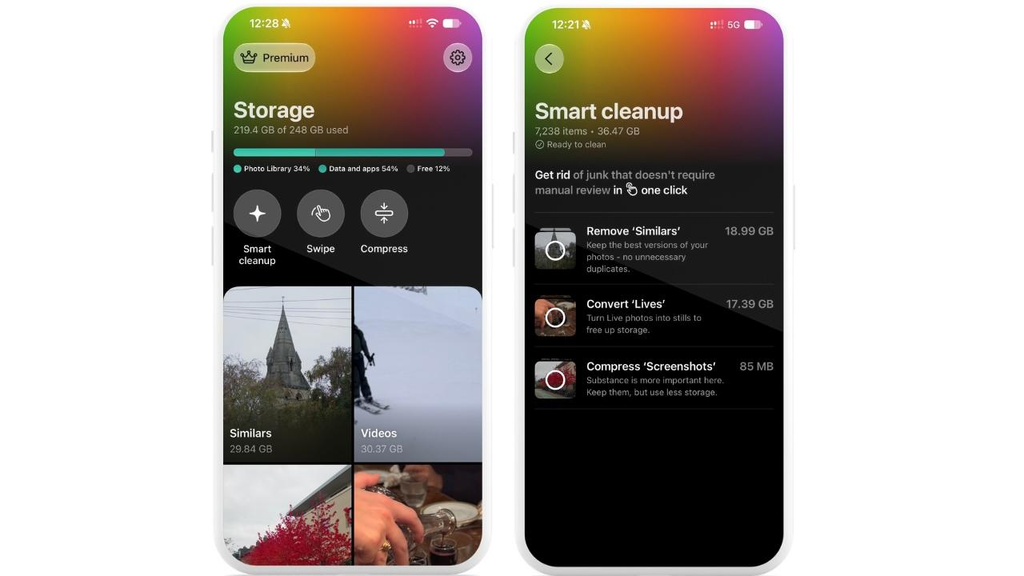
Its purpose is simple: help iPhone users reclaim storage without spending hours sorting through their photo libraries. AI algorithms identify similar photos, while dedicated tools manage large videos, screenshots, Live Photos, and media compression.
What we find particularly useful is the flexibility. You can review each file individually or let Smart Cleanup handle selected tasks automatically. That makes Clever Cleaner suitable for both occasional maintenance and larger cleanup sessions. The app requires iOS 16 or later.
Clever Cleaner Features: What Can It Clean?
During our testing, we focused on Clever Cleaner’s main tools, including Similars, Videos, Compress, Smart Cleanup, and Swipe, to see how each handles different types of media clutter.
Duplicate and Similar Photos
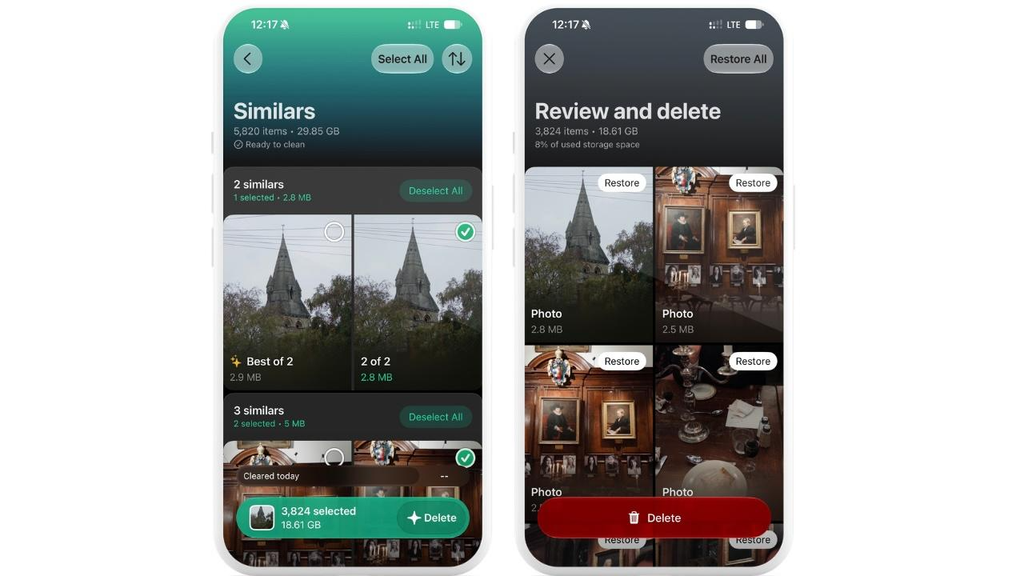
Clever Cleaner groups duplicate and near-identical photos, recommending a Best Shot to keep. This can help with multiple pictures of the same subject. We consider this one of its more useful features, since sorting through dozens of almost identical pictures manually takes time.



However, we wouldn’t recommend blindly accepting every Best Shot suggestion. A different expression, angle, or edit might matter more than the app’s recommendation. If you want to delete duplicate photos on an iPhone safely, review each group first.
Large Videos and Other Media
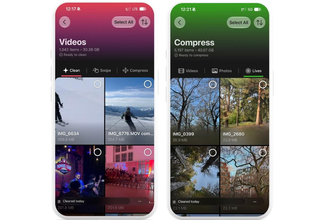
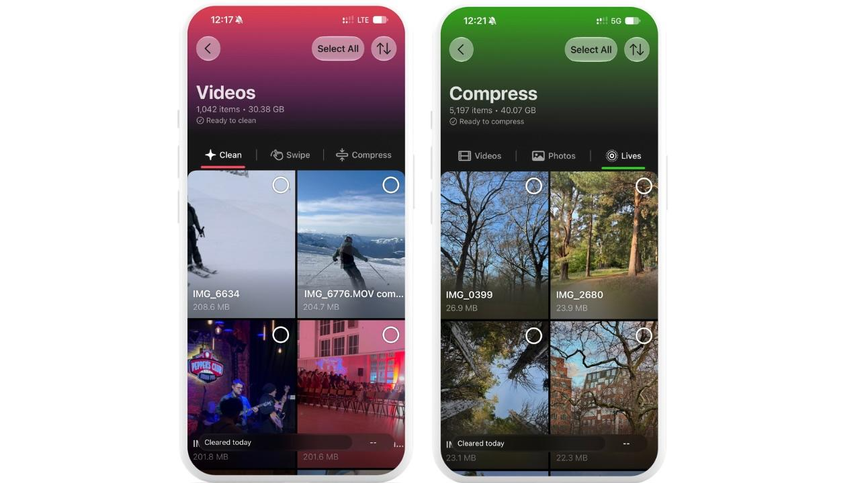
The Videos module sorts clips by size, largest first, or by date. It quickly brings long recordings and oversized videos to your attention without endless scrolling.
Once you’ve found a large file, delete it if it’s disposable or compress it if you want to keep it. This is arguably the most direct route to meaningful savings, since removing or compressing a single lengthy video can potentially free more space than deleting hundreds of ordinary photos. We’d start here when available storage is critically low.
The app also compresses regular photos and screenshots. We like having compression as an alternative to deletion. After all, users don’t necessarily want to lose their memories just to recover a few gigabytes. However, stronger compression can affect visual quality, so we recommend starting with a less aggressive setting.
Clever Cleaner can also convert Live Photos into still images, which removes their short motion clips. That’s fine for casual snapshots, but we’d keep the originals of anything important.
Smart Cleanup and Swipe Mode
Smart Cleanup feature combines three tasks: remove duplicate and similar shots while retaining the recommended Best Shot, compress screenshots, and convert Live Photos into still images. You can enable only the actions you want. It saves repetitive sorting, especially in large libraries. Remember to check the proposed deletions before committing, particularly if your library contains personal or edited photos.
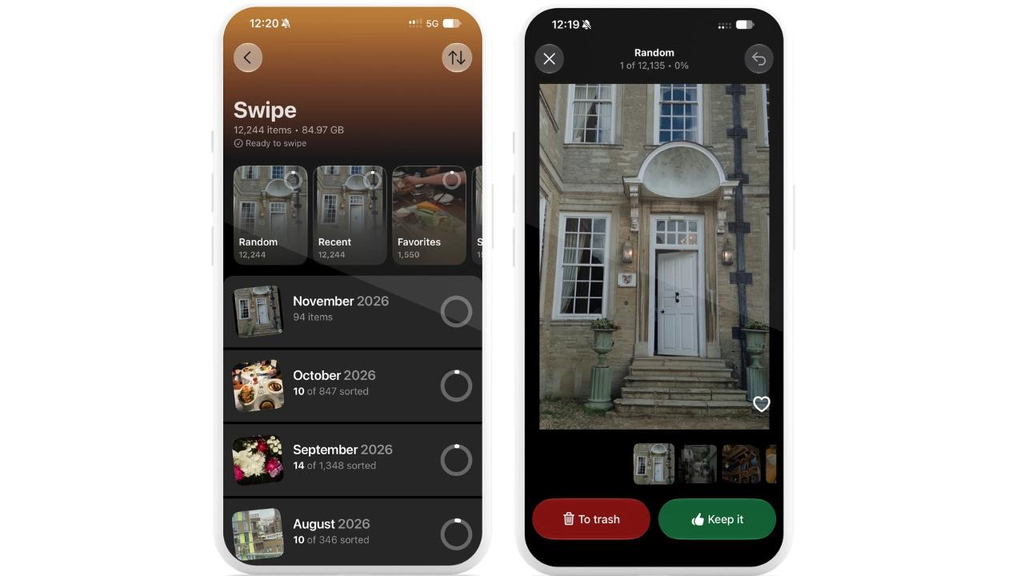
Swipe presents photos and videos individually: left to delete, right to keep. You can review monthly groups or selected media categories instead of scrolling through the entire camera roll. It’s unlimited in the free tier, so you can clean a large library over several sessions without paying.
Does Clever Cleaner Really Free Up iPhone Storage?
Yes, when photo-library clutter is the problem. Based on our testing, Clever Cleaner offers a practical way to identify files that may be taking up unnecessary space. We found its approach particularly useful for reviewing similar photos and locating large videos without manually searching through the entire library.
Our takeaway is that Clever Cleaner can help free up iPhone storage, but the results ultimately depend on how much unnecessary media you have and what you choose to delete or compress.
Note: When you delete photos and videos on your iPhone, they’ll go to the Recently Deleted folder for 30 days. If you’re not seeing much of an improvement to your free space, check this album. If you delete them permanently here, you’ll completely free up your storage, but you lose the ability to easily recover them too.
What Clever Cleaner Can’t Clean
iOS prevents apps from accessing private data from other apps and System Data. This means Clever Cleaner can’t delete System Data, clear cache from another app, delete attachments from Messages or search files within the Files app.
If you go to Settings, General, iPhone Storage and see that photos are taking up a lot of space, then you may be able to use Clever Cleaner. However, if it’s games, streaming downloads or System Data you’re struggling with, then just manage these sections.
How to Free Up Storage on iPhone Using Clever Cleaner
Here’s the cleanup process we’d recommend for getting useful results without deleting important files.
- Check your storage first. Open Settings, tap General, then iPhone Storage. Note the available space and Photos usage.
- Install Clever Cleaner. Grant Full Access to Photos for a complete scan. Limited access excludes files outside your selection.
- Start with Similars. Check Best Shot recommendations and deselect anything worth keeping.
- Review Videos and Compress. We’d prioritize large clips because they offer the greatest potential savings. Delete unwanted videos or compress those you want to preserve.
- Inspect other categories. Review screenshots and Live Photos. Use Smart Cleanup for selected bulk actions or Swipe when you prefer manual control.
- Confirm changes. Review your selection and preserve important originals before converting or compressing files.
- Measure the results. Open Photos, then Recently Deleted, and permanently remove only unwanted files. Compare iPhone Storage against your earlier reading.
Clever Cleaner Pros and Cons
After reviewing its features and limitations, here’s where we think Clever Cleaner performs best and where it could improve.
Pros: Similar-photo grouping, largest-first video sorting, compression options, customizable Smart Cleanup, unlimited Swipe, and no mandatory subscription.
Cons: Limited to photo-library media; AI recommendations require review; compression and Live Photo conversion alter originals; automated tools have daily free limits.
As for pricing, Clever Cleaner is a free iPhone cleaner with daily limits on certain cleanup tools, while Swipe remains unlimited. We think the free version is enough for occasional cleanup, so we’d only consider upgrading if those limits become inconvenient.
Clever Cleaner Vs Other iPhone Cleaners
We also compared Clever Cleaner with several alternatives to understand where it fits.
Apple Photos is free and already detects duplicates, but Clever Cleaner adds similar-photo grouping, largest-first video browsing, and compression in one interface. CleanMyPhone is another photo-focused option with paid features. Cleaner Guru offers additional contact and email tools, although it cannot clear system caches.
Among the best apps, our choice would depend on the storage problem rather than the number of advertised features. For photo-heavy libraries, Clever Cleaner offers a useful balance between automated suggestions and manual control.
Is Clever Cleaner Worth Using?
After testing Clever Cleaner, we think it’s worth trying if photos and videos take up a significant portion of your iPhone storage. Its combination of automated cleanup and manual controls makes sorting through a cluttered photo library easier.
The free version is sufficient to explore the main features, although daily limits make extensive cleanup less convenient. We’d recommend starting with the free tier before considering Premium.
FAQ
Is Clever Cleaner Actually Free?
Yes. Cleanup tools have daily limits, Swipe is unlimited, and Premium is optional. We’d recommend trying the free tier first.
Is Clever Cleaner Safe to Use?
Generally, yes, but review selections carefully. AI can misjudge photos. The developer says processing happens on-device, although this doesn’t rule out analytics data collection.
Why Is My iPhone Storage Still Full After Cleaning?
Check Recently Deleted and allow iOS to recalculate. Other storage categories may also be responsible.
Does Clever Cleaner Delete Photos From iCloud?
Yes, when iCloud Photos is enabled. Deletions sync across your devices, so keep separate backups.
Can Clever Cleaner Clear System Data or App Cache?
No. iOS restricts access to those areas. Use iPhone Storage or app-specific settings instead.