
Apple has previewed a range of accessibility updates powered by Apple Intelligence, introducing new capabilities for features including VoiceOver, Magnifier, Voice Control and Accessibility Reader; it also announced on-device generated subtitles for uncaptioned video content across Apple devices and new eye-tracking wheelchair control support for Vision Pro users. The updates are scheduled to roll out later this year, the company says.
Apple’s Upcoming Accessibility Features

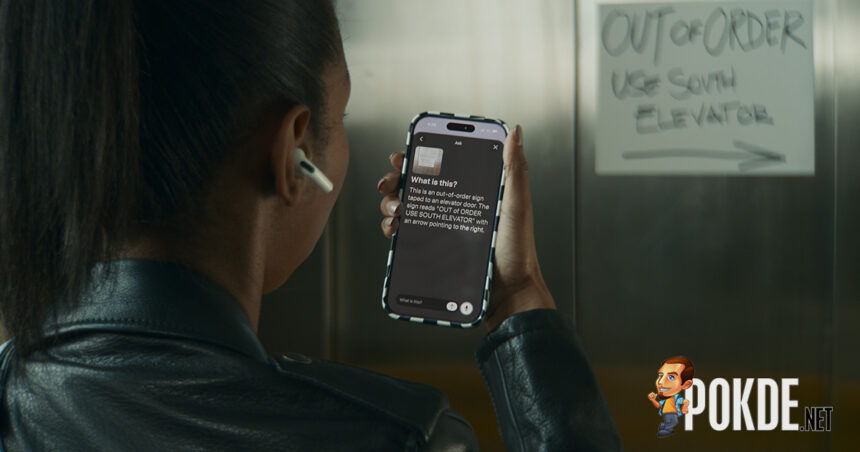
VoiceOver and Magnifier will receive expanded visual description capabilities courtesy of Apple Intelligence. Image Explorer in VoiceOver will provide more detailed descriptions of images across the system, including photographs, scanned documents and visual content, while Live Recognition will allow users to use the Action button on iPhone to ask questions about objects or scenes viewed through the camera and receive detailed responses.
Magnifier will also incorporate Apple Intelligence for visual exploration and description through a high-contrast UI intended for users with low vision, and users can control Magnifier through voice commands such as zooming or enabling flashlight.

Voice Control will add natural language navigation support, allowing users to interact with apps and UI elements without memorizing exact labels or button names. Meanwhile, Accessibility Reader will expand support for more complex content formats such as scientific articles with multi-column layouts, tables and images; the feature will also introduce on-demand article summaries and built-in translation while preserving formatting, fonts and colors.
This one might be a big deal for Apple users: auto-generated subtitles for videos without existing captions. This is perhaps long overdue, given that Android has had this feature since 2019 – Cupertino is almost 7 years late here. Using on-device speech recognition, the feature will automatically create subtitles for any videos on all of the company’s operating systems. Subtitle appearance settings can be customized through playback controls or system settings.

For Vision Pro, Apple announced a new accessibility feature that enables compatible power wheelchair users to control supported alternative drive systems using eye tracking. The feature is designed for users who cannot operate traditional joystick controls and will initially support Tolt and LUCI drive systems in the United States through Bluetooth and wired accessory connections.
Apple also confirmed broader availability of the Hikawa Grip & Stand for iPhone, an adaptive MagSafe accessory developed with accessibility-focused design considerations. The accessory is now available globally through the Apple Store online in three additional color options following a collaboration between Hikawa and PopSockets.

Additional accessibility updates announced include Vehicle Motion Cues support for visionOS to help reduce motion sickness, new face gesture controls for Vision Pro, expanded Touch Accommodations in iOS and iPadOS, improved pairing for Made for iPhone hearing aids, larger text support for tvOS and expanded Name Recognition language support for users who are deaf or hard of hearing.
Apple also introduced a new API for sign language interpretation apps to support adding interpreters into FaceTime calls and confirmed support for the Sony Access controller across iOS, iPadOS and macOS for users requiring alternative gaming controls.
Pokdepinion: Better late than never for the auto subtitles feature.