
Microsoft’s EVP for Windows and Devices, Pavan Davuluri, has published an update on the commitment to Windows quality (better known for its codename, “Windows K2”) it outlined in March 2026, covering changes rolled out to Windows Insiders, with plans for broader release across Windows 11 PCs beginning this fall.
The March commitment identified several areas of focus, including additional taskbar customization, AI debloating, reduced disruption from Windows Updates, improved File Explorer performance, greater control over widgets and feed experiences, changes to the Windows Insider Program and improvements to the Feedback Hub. The company also named performance, reliability and design quality as three overarching priorities.
Windows K2 Progress Thus Far
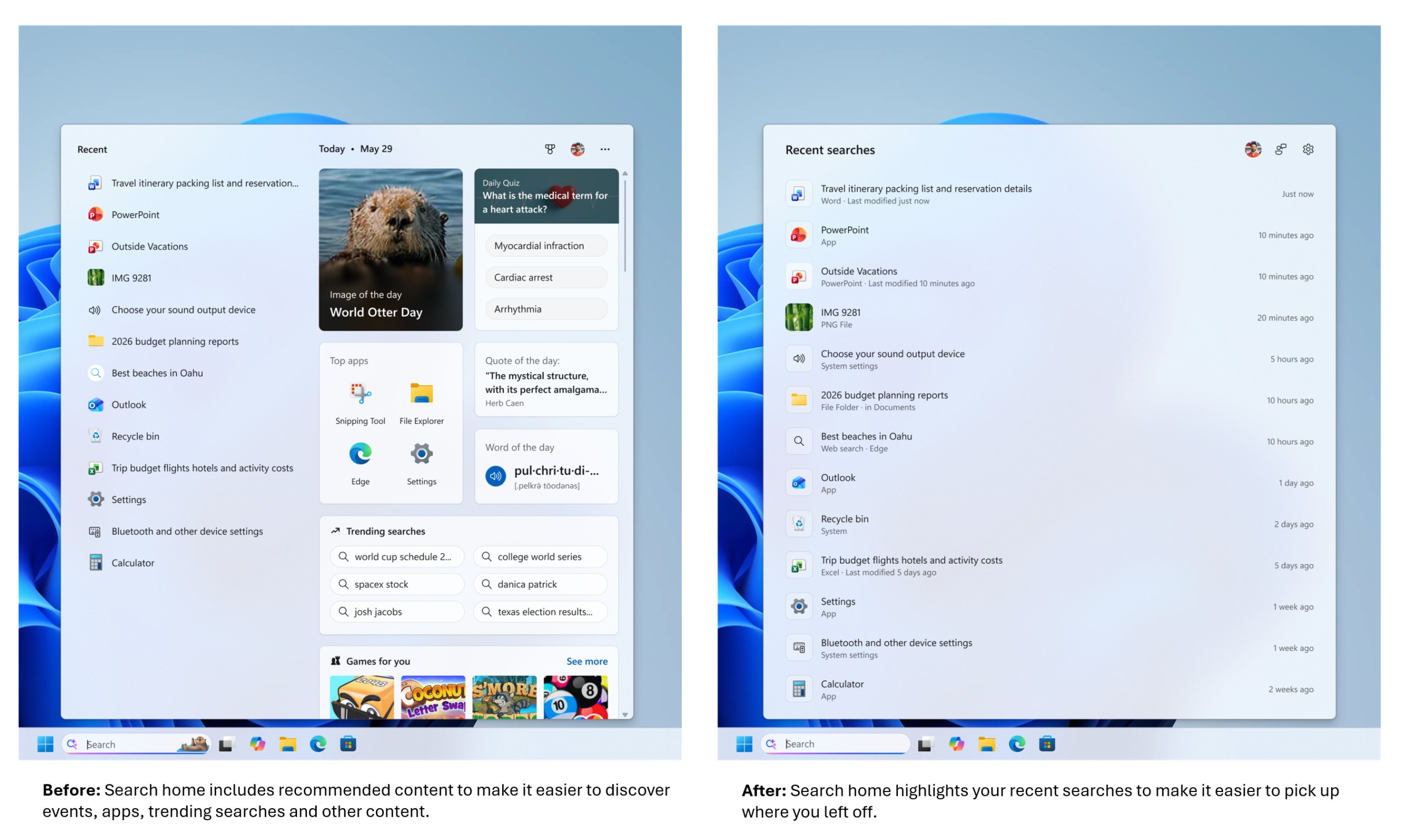
Davuluri reported that changes to the Windows Search Box now features a simplified home screen, clearer search results and removal of promotional content from web results. The WinUI 3 is now expanded to additional parts of the Windows shell, including Widgets and Run (Win+R), with further updates to Autoplay and File and Folder Properties dialogs planned for experimental Insider builds. Microsoft also began previewing changes to the Taskbar and Start menu, including the ability to reposition the taskbar and additional Start menu personalization options.

Microsoft also noted on its efforts to “simplifying AI throughout the OS,” with the new approach being “more intentional and focused on the experiences that provide the most value to customers.” File Explorer received updates addressing architecture, responsiveness and reliability, including changes to Home screen transitions and thumbnail rendering, along with updates to the Address Bar, file size formatting, keyboard navigation and file renaming. Widgets and feed were also updated which makes them “quieter by default.”
The company also introduced the Driver Quality Initiative (DQI) as its latest effort focusing on driver quality, reliability and security. Microsoft claims reported improvements to USB4 docking performance, Bluetooth device compatibility (including with AirPods) and printer connectivity, including reduced failures in network printer discovery. Application responsiveness and scheduler performance has been improved as well, benefiting interfaces such as Start, File Explorer, Search and Snipping Tool, plus improved boot and logon times and faster compile times for developers.
Microsoft also reported ongoing improvements to memory efficiency across the operating system, including a more efficient memory allocator, continued tuning of WinUI 3 and efficiency changes to Chromium and WebView2 components (which hopefully means we can ditch that Frankenstein Outlook “app” for good). Windows Hello sign-in reliability using facial recognition and fingerprint authentication was also updated during this period.
Notably, while it may be 10 years too late, but it seems like Redmond has finally gotten the memo: there’s new changes intended to reduce disruption from Windows Updates, including the ability to skip updates during the out-of-box experience (so you don’t have to wait for hours while setting up a new PC) and extend update pauses. Windows Insider Program structure was also updated with a reduction in the number of channels and providing more control over which features participants receive.



The company says it’s not done yet while climbing the proverbial K2 mountain – it promises to continue work on its original focus areas while expanding into four additional areas: faster onboarding and setup, memory optimization for devices with 8GB of RAM and above (which we can really do with right now); family features and parental controls; and voice interaction, hopefully not involving excessive amounts of AI this time.
Pokdepinion: Can we please get that damned Copilot key off the keyboard next?