

Product Name: Predator Helios Neo 16 (PHN16-I31-71VG)
Brand: Acer
Offer price: 7999
Currency: MYR
-
Appearance - 8.5/108.5/10
-
Efficiency - 7/107/10
-
Features - 8/108/10
-
Materials - 8/108/10
-
Performance - 7/107/10
-
Portability - 7/107/10
-
User Experience (UX) - 7.5/107.5/10
-
Value - 5/105/10
Summary
The Acer Predator Helios Neo (2026) packs budget-grade hardware that performs decent by our standards, but the pricing caused by AI-induced surge means this is not going to be anywhere close to a good value.
Overall
7.3/10Pros
+ Decent CPU and GPU performance for 1080p gaming
+ Many power modes, manual fan tuning available
+ MUX switch present
+ Keyboard & touchpad is serviceable
+ Understated design, but not boring
+ Solid I/O with 2.5GbE LAN & dual Thunderbolt 4 ports
Cons
– No webcam shutter
– RAM & SSD not user-upgradable due to warranty
– Speaker quality is meh
– RM7,999 price tag is insanity
Unboxing


Here is Acer’s new (or rather, refreshed) Predator Helios Neo 16 gaming laptop on our desk, and we shall start with the unboxing that reveals two compartments: one for the laptop, and one for the charging cables.

You don’t get much beyond the aforementioned items, with the documentation being the sole extras (and a Planet9 invitation card of sorts). Here’s the full list of items:
– Setup guide
– International Warranty card
– Warranty card
– Planet9 card
– AC charging cable
– 330W DC power supply
– Acer Predator Helios Neo 16 laptop main unit
Walkaround


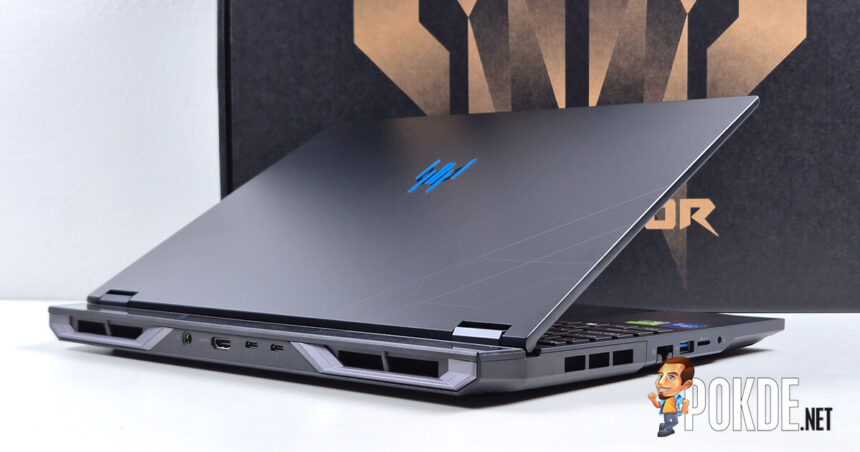
The Acer Predator Helios Neo 16 is a gaming laptop first and foremost, and Acer’s design styling made doubly sure it looks the part. Diagonal lines, space-age themes, RGB, you name it – it’s all here. That being said, it still manage to look relatively understated even by gaming laptop standards.
Inside you’ll find a FHD+ (1920 x 1200) 180Hz IPS display that does the bare minimum on colors (by my standard, that is) with 100% sRGB gamut coverage. Better than the “45% NTSC” panels of old that doesn’t belong to modern laptops, and the anti-glare panel is a plus, too. Above it, within a slim bezel, houses a 1080p webcam with microphones alongside, though there is no physical shutter to be found (nor an easy-to-access killswitch).


The 16-inch chassis fits a full 96% keyboard layout (typical on most gaming laptops), with a few twists: next to F12 is a “Acer My Key” that offers one-key access to certain features, though it is not the full macro key like you’ll see in some ASUS ROG laptops; next to NumLock (where NumLock typically is located) is the PredatorSense key that offers immediate access to the software for adjusting laptop-specific features, such as power profile, MUX switch, 4-zone RGB customization, and more. You can also find the Turbo key above the keyboard, as well as media controls next to the power button on the top-right.
Meanwhile, the Right Ctrl key is, unfortunately, replaced by Microsoft-mandated Copilot key that almost nobody wants, just like virtually every other Windows laptop sold today; that said, Acer probably could’ve use the Context Menu key as Right Ctrl instead, the implementation of which we have only seen in ASUS TUF Gaming laptops as of late. Keyboard layout aside, we find the touchpad sufficient large and found no significant issues during use.
![[Updated: Pricing] COROS PACE 4 Pro Now Available With Larger Display And Longer Battery Life - 90](https://cdn.pokde.net/wp-content/uploads/2026/10/14185816/corospace4procover-330x220.jpg "[Updated: Pricing] COROS PACE 4 Pro Now Available With Larger Display And Longer Battery Life - 91")



Down below, the laptop features plenty of vents and two AeroBlade 3D fans to keep the heat out of the way. Heat isolation is solid – during heavy use the chassis doesn’t transfer much heat to the keyboard or palm rest regions, since the chassis, mostly made of plastic, doesn’t transfer heat easily. Four exhaust ports handle the hot airflow out of the system, with the center portion of the chassis partly exposed to allow some air to cool surface-mounted components, as well as things like SSD and RAM.
Speaking of which, if you intend to upgrade or replace SSD and RAM modules, you technically can’t do that due to Acer’s odd warranty policies with regards to gaming laptops. It’s common knowledge that gaming laptops allow experienced users to perform maintenance and upgrades on their own, but Acer prevents that by having an anti-tamper seal officially preventing anyone outside of its own technicians from performing the upgrade (otherwise warranty becomes invalid unless your jurisdiction’s laws cover such cases), while also using the uncommon Torx T6 screws as well. That’s points deducted for upgradability and repairability.


Side profile views are next, where we can see another microphone located on the bottom part of the chassis on top of the ones seen next to the webcam; the rear features two of the four exhaust ports, alongside additional I/O (Thunderbolt 4 ports exclusively reside here). The hinge opens up to 135 degrees, with a sizeable overhang beyond the hinge to fit cooling components, such as heatsinks.


For I/O, let’s start from the left: there’s the 2.5GbE LAN port (a rarity, as most still stick to 1GbE LAN even in 2026), USB-A port, a microSD card slot, and a headphone jack. On the right there’s a pair of status indicators for power and battery, and next to them are a pair of USB-A ports with one supporting offline charging. Behind, you’ll find the DC barrel jack that gets supplied with up to 330W of power, along with a HDMI 2.1 port, plus two Thunderbolt 4 ports that outputs discrete GPU’s DisplayPort signals and accepts 100W of power via the USB Power Delivery protocol.
Specifications
Acer Predator Helios Neo 16 (PHN16-I31-71VG)
| CPU | Intel Core i7-14650HX 5.2GHz / 8P+8E cores, 24 threads |
| RAM | 16GB (1x16GB) DDR5-5600 (SODIMM) |
| GPU | Integrated: Intel UHD Graphics (16 EUs @ 1.6GHz) Discrete: NVIDIA GeForce RTX 5050 Laptop GPU MUX Switch present |
| NPU | None |
| Storage | Kingston Industrial 512GB SSD OM8SGP4512K2-CA0 PCIe 4.0, M.2 2280, TLC |
| Display | BOE NE160WUM-NY9 16″ IPS, anti-glare non-touch panel 1920 x 1200 (16:10) 180Hz refresh rate, 3ms overdrive response time 100% sRGB, 8-bit (16.7M colors) 400 nits SDR max brightness |
| Keyboard | 4-zone RGB backlighting |
| Touchpad / Stylus | Precision touchpad |
| Audio | Stereo speakers DTS:X Ultra support |
| Webcam | 1080p IR webcam Shutter not present |
| Biometrics | None |
| I/O | Left: 1x 2.5GbE LAN (Killer E3100G) 1x USB-A 5Gbps 1x microSD (SDXC) card reader 1x 3.5mm combo jack Right: 1x USB-A 10Gbps 1x USB-C 10Gbps (USB offline charging support) Rear: 1x DC barrel jack 1x HDMI 2.1 2x Thunderbolt 4 (DP 2.1 Alt Mode via dGPU, 100W USB-PD) |
| Wireless Connectivity | Intel Killer AX1675i (Wi-Fi 6E) 160MHz tri-band, 2×2 MIMO Bluetooth 5.4 |
| Battery | 92Wh 4-cell Li-ion |
| Power Supply | 330W DC power supply (barrel connector) 100W USB-C Power Delivery support |
| Operating System | Windows 11 Home 25H2 |
| Dimensions | 356.78 x 275.5 x 26.75 mm |
| Colors | Abyssal Black |
| Weight | 2.5kg |
Performance

Quick note: Acer offers five different power modes in total for the Predator Helios Neo 16, ranging from most aggressive Turbo mode that pins both fans at max speeds all the way down to Eco that only operates under battery power. We will test all five modes in our benchmarks below, unless otherwise specified.
(Also: Due to software-related issues, Novabench and Procyon Battery Life tests are skipped in the performance review.)
Storage

From what we can tell, while Acer only offered 512GB of storage for its SSDs, the hardware itself isn’t a low quality one despite the AI-induced price surge making SSDs and RAM prohibitively expensive these days. The Kingston Industrial series 512GB SSD offers solid performance overall thanks to its TLC NAND design that, on paper, also offers better endurance as well. That being said, it’s not a lot of space to fit games – we only managed three before we can even proceed to test the remainder of our gaming catalog.
CPU


This particular variant of Acer Predator Helios Neo 16 packs an Intel Core i7-14650HX that features 8 P-cores and 8 E-cores in total, which offers reasonable multi-core performance among the class of budget-adjacent gaming laptops. Comparing to the MSI Sword 16 HX with a matching processor model, the Acer’s equivalent outperforms it on both models’ respective default power modes.
GPU


Regarding GPU performance, the RTX 5050 – being the slowest model on the Blackwell-based Laptop GPU offering – outperforms our RTX 4060 example, as well as the Radeon 8060S found in the AMD Ryzen AI Max-powered ASUS ROG Flow Z13 (although the GPU is quite power constrained in this case due to chassis limitations). That being said, it’s only roughly twice the performance of the Intel Arc B390 found in ultrathin laptops, so that’s nothing much to celebrate especially if you’re looking beyond 1080p gaming or, more importantly, high-quality graphics.
System

For the PCMark 10 Modern Office, keep in mind that Windows 11 optimizations likely contributed to a big spike in Productivity scores as we have observed in the laptops that we have reviewed recently. That said, the Acer Predator Helios Neo 16 sits in the middle in terms of Essentials score, while Digital Content Creation lags behind both the Arc B390 and Radeon 8060S – likely a result of unified memory architecture contributing to this, which RTX 5050 does not use. It is otherwise more or less in the same ballpark as other discrete GPUs we’re comparing in this chart.
Battery

Battery life is pretty decent by gaming standards, with the two available modes – Balanced and Eco – both lasting roughly 7 hours of use with the laptop’s sizeable 92Wh battery. What’s surprising though is the ROG Flow Z13 barely lasted longer than that, so that’s a pretty good showing for Acer despite using older processor architecture that comes with power efficiency penalties. Either way, if your priority is battery life but still want to game on the side, the MSI Prestige 14 Flip AI+ or similar models that packs Intel Core Ultra X7/X9 processors will do the trick.
Gaming

Finally, we look at gaming benchmarks. A total of four power modes are tested here as we skipped Eco, given that it caps FPS to 30 by default; we also tested Turbo mode with MUX switched to discrete GPU to see how much this gaming laptop can offer. In most cases, the RTX 5050 can achieve 60+FPS in Medium to High settings at 1080p resolution, while Quiet Mode lowers the performance down a notch, still offering playable framerates with much quieter fans.
The Good

On its own, the 2026 model year of Acer Predator Helios Neo 16 is a pretty solid gaming laptop, if not without the usual set of minor tradeoffs. CPU-wise, while not being on the latest-and-greatest (such is normal in this segment), it’s definitely serviceable in most cases; considering it’s an old chip, the laptop still managed to get decent battery life out of it as well. Acer also offers great levels of flexibility with five power modes which you can access via the dedicated button, along with manual fan tuning and MUX switch accessible via PredatorSense.
Gaming laptops are slowly trending towards the direction of minimalism which inadvertently makes some models too “safe” and bland as a result. It’s good to see for those who wants a bit of character out of their battlestation, Acer got you covered with this chassis. It’s definitely less shouty than pre-refreshed models (i.e. 2023 model), but not entirely just a flat slab of rectangle that looks like the laptop equivalent of Toyota Corolla.
The keyboard is decent to type on if you don’t mind the offset due to having a 96% layout, and it’s decent too, layout-wise, if you ignore the dreaded Copilot button which Microsoft seemed hellbent on making sure everyone uses it for the sake its KPIs. Touchpad is solid for a diving board design, at least, though we shall praise the laptop’s I/O, offering less common features like 2.5GbE LAN port (most feature just 1 Gigabit if they ever come with one), dual Thunderbolt 4 ports (pretty uncommon in gaming laptops), and a microSD card slot. If I’m being picky, having a full-size SD card slot instead of the miniaturized one should make this just about perfect.
The Bad

As far as feature downsides go, we could name a few. The lack of webcam shutter isn’t great, so I hope the next redesign (presumably soon given that the latest major chassis redesign is 3 years ago by now) can include this as standard, if not at least an electronical killswitch for privacy’s sake. On the subject of being geriatric, Acer could really do with some change in policy with regards to user upgrades – performing RAM and SSD upgrades shouldn’t automatically void warranties, full stop.
Another lackluster part of the chassis we need to address is the speakers. It’s loud, but it sounds rather flat, and we tried our best with EQ tuning but to no avail. Bring your own headphones or relevant audio hardware if you’re picky about how sounds should sound. Also, being picky on our part perhaps: given that this is a premium gaming chassis by Acer’s definition, having per-key RGB feature would’ve been nice (especially for the price you’ll be paying for)?
And finally, one last downside – and a major, deal-breaking one at that. See below.
Verdict

On paper, this particular Acer Predator Helios Neo 16 looks like one that serves the cheaper side of the gaming laptop segment, so surely it’s still comparatively cheap despite the pricing shock, right? Well… bear with us while we write the price in bold, red text: RM7,999. We’re not joking – you’re paying THAT much for just RTX 5050, 16GB RAM and 512GB storage, even if the rest of the chassis is pretty solid. As the internet says these days: You do not hate Sam Altman enough.
With this price, we simply cannot recommend anyone buying this laptop, even if the execution isn’t necessarily a flawed one. (Just in case, we’ll leave the Acer eStore link here in case by some miracle the AI industry collapsed and brings pricing back to normalcy – if it ever gets down to RM5-6K or so, you can consider it by then.)
Special thanks to Acer Malaysia for providing the Predator Helios Neo 16 gaming laptop for this review.