
Product Name: Music Studio 7 (LS71H)
Brand: Samsung
Offer price: 1999
Currency: MYR
-
Appearance - 8.5/108.5/10
-
Features - 8/108/10
-
Materials - 9/109/10
-
Performance - 8/108/10
-
User Experience (UX) - 8.5/108.5/10
-
Value - 7.5/107.5/10
Summary
The Samsung Music Studio 7 (LS71H) speaks simplicity: it is easy to operate, and it offers timeless looks – both things crucial to home theater setups or just for someone who likes things simple.
Overall
8.3/10Pros
- Flexible configuration options
- Decent soundstage
- Easy to setup
- Various software integration features
- Modern looks, great build quality
Cons
- No remote control
- Lacks analog input options
Samsung might not be the first name you’d think of when it comes to speakers, but they do have a pretty wide range of audio offerings, mostly TV-adjacent ones. The Samsung Music Studio 7 that we’re looking at today is less of a soundbar and more of a standalone unit that can function as a Bluetooth speaker, a part of the TV audio setup, or form a part of multi-speaker array.
Unboxing & Walkaround


The box opens by tearing off the sealing strip, which reveals two compartments: the speaker itself (already packed by a cloth bag with a handle), and the accessories in a dedicated box. Simply grab the handle and lift the speaker out of the box, though be wary of its rather hefty weight – we recommend using two hands.

The things included in the accessories box are nothing more than the documentation and the cable itself. Note that the speaker is not battery-powered, so you’ll need the cable to power it on at all times. Among the papers include a guide which explains what the buttons do, and you should read that first before powering it on, given the speaker’s minimalist design which doesn’t tell you a whole lot on what the buttons do on the unit itself.


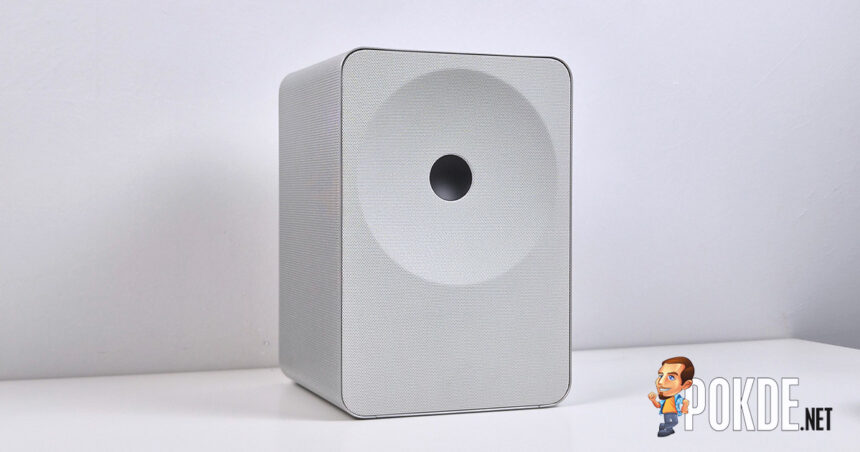
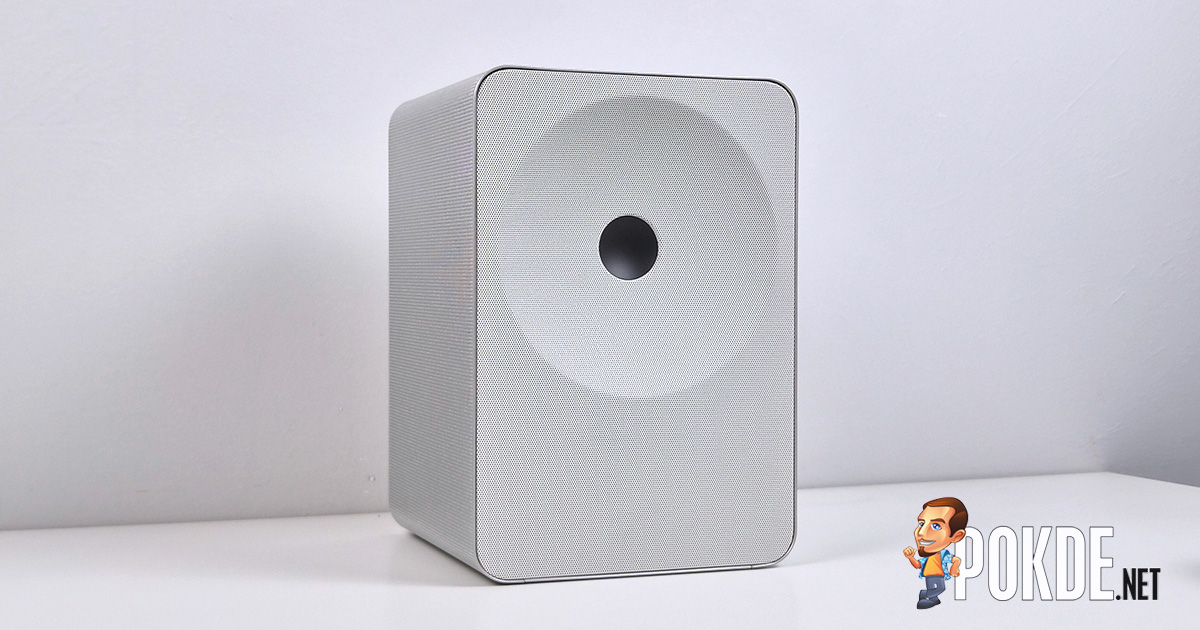
Samsung says the Music Studio 7’s design is the work of Erwan Bouroullec (with the EB logo featured at the back), featuring a “Dot Design” with a dot in the middle of the “diaphragm”, while the rest of the chassis are covered by perforated grille throughout. Note that the model we have here is the white version (LS71H), and Samsung offers the black version (LS70H) as well.
All of the controls are laid out at the top of the unit, with five buttons: Multi-function button (power on if standby, mode switch if powered on), volume down/previous track button, Instant Play button (play/pause, next track), volume up button, and the microphone switch/Bluetooth pairing button. An LED indicator, which displays the speaker status, is hidden within the top part of the front grille.


The Samsung Music Studio 7 offers two I/O options: S/PDIF (TOSLINK) optical input, and the HDMI eARC output. The USB port next to it is a Service port used only for firmware; the AC port is located on a different part of the rear cutout, for which Samsung provided an angled AC connector so you don’t have to worry about bending cables. There is also a mounting point (for threaded screws) right in the middle of the underside for home theater installations.

The Samsung Music Studio 7 features a 3.1.1-channel layout, of which there are five channels – left, center, right, sub, and overhead. Samsung didn’t expect specify how many drivers are packed within, though its marketing materials seem to suggest the sound waves propagate from four of the six faces (excluding rear and bottom) of this box-shaped speaker. It works with spatial audio standards such as Dolby Atmos and Eclipsa Audio, and as far as brand synergy goes, it works with other identical units, as well as Samsung TVs via its Q-Symphony feature.


Specifications
Samsung Music Studio 7 (LS71H)
Full specifications available on product webpage.
| Form Factor | Bookshelf speaker |
| Audio Channels | 3.1.1-channel (5 speakers) 104mm woofer 32mm supertweeter 40mm midrange drivers |
| RMS Output | Unspecified |
| Software Features | SmartThings Q-Symphony Wireless Dolby Atmos Chromecast Spotify Connect Spotify Tap Roon Ready Apple AirPlay Tidal Connect |
| Voice Assistant Support | Google (Gemini) |
| Connectivity & I/O | HDMI (eARC / CEC) output S/PDIF (TOSLINK) input Bluetooth 6.0 Dual-band Wi-Fi (2.4GHz & 5GHz) USB port (service only) |
| Operating Power | 20W, AC power only 0.5W standby |
| Colors | Black (LS70H) White (LS71H) [As tested] |
| Dimensions | 185.0 x 269.0 x 190.5 mm |
| Weight | 5.6kg |
User Experience


Like many audio products, you’ll need a companion app the get the most out of the Samsung Music Studio 7. In this case we’re looking at the Samsung Sound app (requires Android 12 & iOS 13 or later), which brings you straight to the pairing process once you get through the user agreement stuff. Simply enable relevant permissions and settings, and you can see the model in the menu; connect the device to your Wi-Fi connection (works on both 2.4GHz and 5GHz bands) and you’re good to go.


The app starts with listing the devices you own, in this case we only have the Music Studio 7 in the list; tapping the card brings you to the device menu that includes all the settings in a single page.


By default, you’ll be shown a simplified version of the EQ controls under the “Music” preset, where you can adjust the bass and treble levels; a separate menu under “Woofer” gives you control that part of the speaker as well. If you prefer to do the fine-tuning, selecting “Standard” mode will reveal the 7-band EQ accordingly; or if you just want to have the software deal with the tuning, AI Adaptive Sound will do exactly that.
Given that this speaker is also meant for TV use, Samsung has carried over some of the audio features you’ll commonly see in TVs, such as voice enhancements (though oddly there’s a separate “Active Voice Amplifier Pro” toggle in the main menu as well), bass enhancements, night mode, and auto volume. There’s also AI Dynamic Bass Control (obligatory AI branding), Group Play (up to 10 speakers), and of course, the Q-Symphony feature that allow Samsung TVs to pairs its onboard speakers with the Music Studio 7 to form a wider audio setup.
One feature that I find surprising useful is SpaceFit Sound Pro, and getting it to work is dead simple: just toggle the switch on and it’s ready to go. You don’t even need to do any room calibration setups at all! Another one that can be useful on parties or events is Ambient Sound mode, which is fairly self-explanatory.

We should note that Samsung has only given us a single unit of the Music Studio 7, so we can’t exactly say how good a two-speaker stereo setup would be. That being said, the speaker technically can do stereo audio on its own; soundstage-wise, it’s adequate as far as single speaker unit goes, though we recommend pairing another one of these to properly extract the potential of this speaker.
I am also pleased to report that as soon as you get it out of the box, not much tuning is needed, if at all. Going through a few songs and genres and I can say the speaker does well across the board, and I find no urge to get into the EQ settings (apart from setting it to Standard mode since the overarching audio modes does behave differently) to mess around the dials even though I’ve made it quite a recurring habit as soon as I touch new audio hardware (or any new laptop that I review) these days.
The Good

While it looks simple, the Samsung Music Studio 7 packs a lot underneath – it works as a standalone unit, as a part of a wider speaker setup, or as part of the TV audio configuration (provided you have a Samsung TV to match). That’s just the wireless side of things, where HDMI eARC and S/PDIF offers even more setups which should cater to a lot of audience.
Aside from the hardware features it offer, Samsung has given this speaker plenty of software integrations from brands such as Spotify (Spotify Connect), Tidal (Tidal Connect), Google Cast, Apple AirPlay 2 (wireless casting), and Roon Ready (high-resolution audio streaming). Easy to setup, too, as I only took one minute to get things going, which is fast even by modern home gadget standards.
The Bad

Small things worth pointing out: while most controls can be accessed via the app, it wouldn’t be the most convenient if this speaker is shared with several people, such as a living room – in such case, having a remote control would be a nice feature to have. Another omission we found, which could be inconvenient in some cases, is the lack of analog connection (i.e. 3.5mm or RCA jack) for devices like turntables.
Verdict

The Samsung Music Studio 7 is available at the price of RM1,999, which isn’t too bad of a price given the amount of features and the design you’re paying for. The highlight of the speaker comes down to its mastery of simplicity, and when you’re looking at the premium speaker market, it’s the one thing that matters a lot to potential customers in this category.

Special thanks to Samsung Malaysia for providing the Music Studio 7 (LS71H) for this review.