


Product Name: AERO X16 (EG61H)
Brand: GIGABYTE
-
Appearance - 8/108/10
-
Efficiency - 6.5/106.5/10
-
Features - 7.5/107.5/10
-
Materials - 7.5/107.5/10
-
Performance - 8/108/10
-
Portability - 9/109/10
-
User Experience (UX) - 7/107/10
-
Value - 8.5/108.5/10
Summary
The GIGABYTE AERO X16 (EG61H) genuinely could be great in a time where good laptops are hard to come by at a reasonable price – but they need to put the focus on fixing GiMATE first.
Overall
7.8/10Pros
+ Understated design, great for office environments
+ Quiet fans in most cases
+ Thin and light chassis
+ Solid keyboard to type on, Right Ctrl key still exists
+ Still packs a 1TB SSD
+ Great value (for now), despite memory supply crunch
Cons
– 16GB RAM hurts performance
– Only a single-zone RGB
– Lacks webcam shutter
– An SD card slot would be nice
– GiMATE software needs proper bugfixing
– AI chatbot is far from useful in most occasions
Unboxing & Walkaround
We have a slightly unusual laptop to review today, and it comes from GIGABYTE. This Taiwanese company is better known for desktop PC motherboards and GPUs, and while they do make laptops, their presence here in Malaysia is lesser-known when compared to some of its compatriots like ASUS, Acer, MSI, and so on. Specifically, we’re looking at the GIGABYTE AERO X16 (EG61H), with the SKU model number 1WH for this variant.

We should note that the review unit provided by GIGABYTE did not come with a retail packaging, so this is not representative of what you might get if you buy the laptop in retail stores. We did get the following items:
– AC cable (Type B, North America / Japan / Taiwan)
– 150W DC power supply
– GIGABYTE AERO X16 (EG61H) Laptop


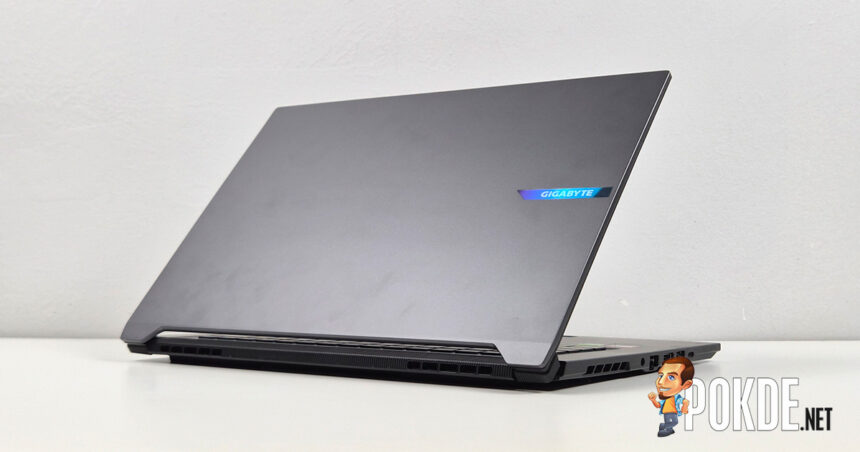
As the less gamery part of GIGABYTE’s laptop range, the AERO X16 features a highly minimalist design on the outside – you wouldn’t be able to tell this is a gaming/creator laptop unless you see it up close. Inside you’re greeted by a 16-inch QHD+ 165Hz IPS panel, with the webcam array tucked within the slim bezel (which unfortunately lacks a physical shutter). It does have Windows Hello support owing to the presence of IR-sensing hardware though.


The keyboard adopts 75% layout – meaning no numpads despite being a 16-inch chassis – with a few special features. Between F12 and Delete key is where you’ll find the GiMATE button, and unlike most laptop with dedicated companion app keys, pressing this one will surface its AI chatbot, and not the app itself. Definitely a sign of AI fad-chasing here.
Power button stays out of the way located at the center top, and surprisingly, the laptop maker did not sacrifice the Right Ctrl key to fulfill Microsoft’s almost-ridiculous Copilot key demands. Note that the entire keyboard only has a single-zone RGB to work with, so you won’t be finding any kind of lighting effects aside from the most basic ones (which can be controlled via Windows 11’s native Dynamic Lighting feature as well).


Plenty of airflow to be had under the laptop, with perforations allowing fresh air to be drawn into the two fans cooling all the components onboard. We happened to spot a vacant RAM slot as well, since this laptop is only equipped with 16GB of DDR5 RAM amidst today’s severe supply crunch. Bonus points on GIGABYTE’s part for using standard Phillips screws securing the bottom panel, so maintenance should be relatively easy to do.


As far as gaming/creator laptops go, the GIGABYTE AERO X16 is among the slimmest chassis we can find. Its thickest point measures just short of 20mm, while the thinnest point is just 16.75mm; despite that slim profile, the laptop managed to fit enough cooling to handle an NVIDIA GeForce RTX 5070 Laptop GPU with 85W TGP. A fair bit short than the 115W figure found in heavier class of gaming laptops, but more than enough power to outperform the likes of RTX 5050/5060 at full tilt all while keeping the entire thing thin and light.





As far as I/O goes, it’s serviceable – there’s the Gigabit Ethernet port, a HDMI 2.1 output, three USB-A ports, a USB4 port, and a headphone jack. For some reason, the USB-A ports are fairly slow by today’s standards, with two of them maxing out at 5Gbps (USB 3.2 Gen 1 standard), while one of the rightward-facing ports is in fact a USB 2.0 port that only provides 480Mbps of bandwidth. Also, despite being marketed as a creator’s laptop, the lack of an SD card slot seems like a pretty glaring omission in my opinion.
Specifications
GIGABYTE AERO X16 (EG61H) – Variant Model 1WH93-MYC94AH
Full specifications available in product webpage.
| CPU | AMD Ryzen AI 7 350 5.0GHz / 8 cores (4C+4c), 16 threads |
| RAM | 16GB (1x16GB) DDR5-5600 (SODIMM) Second slot vacant |
| GPU | Integrated: AMD Radeon 860M Discrete: NVIDIA GeForce RTX 5070 Laptop GPU (8GB GDDR7, 85W TGP) MUX Switch present |
| NPU | AMD XDNA2 NPU (50 TOPS) |
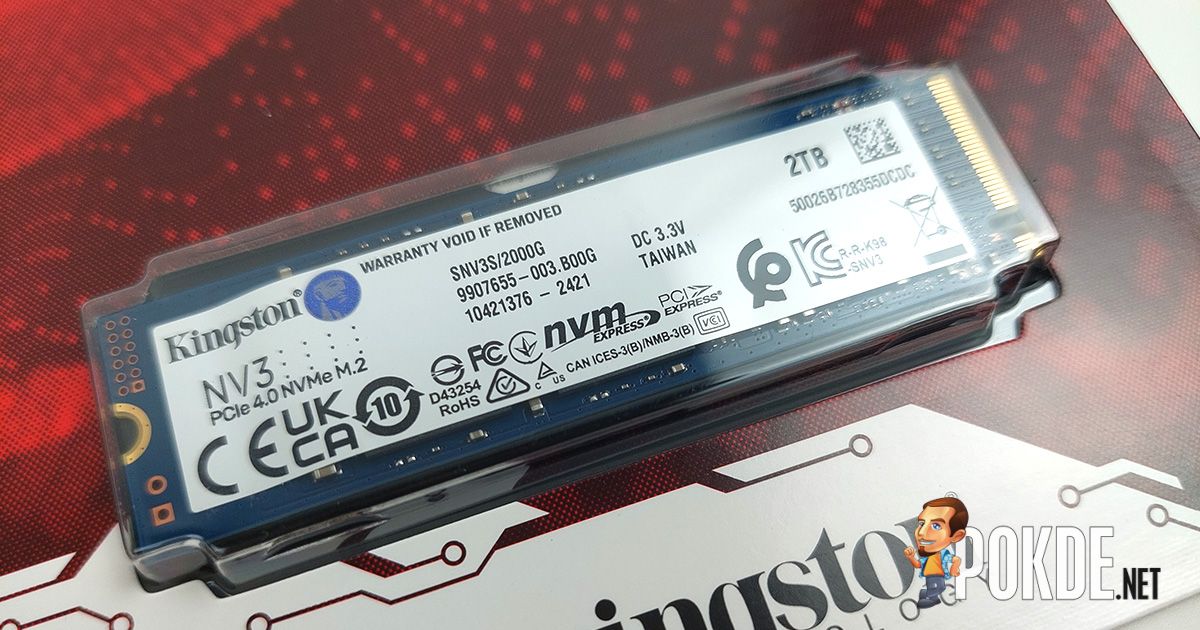
| Storage | Slot 1: Kingston Industrial 1TB SSD OM8PGP41024Q-A0 PCIe 4.0, M.2 2280, TLC Specs Slot 2: Vacant |
| Display | BOE NE160QDM-NYJ 16″ IPS, anti-glare non-touch panel 2560 x 1600 (16:10) 165Hz refresh rate, 3ms overdrive response time 100% sRGB, 8-bit (16.7M colors) 400 nits SDR max brightness Pantone® Validated TÜV Rheinland Low Blue Light |
| Keyboard | 75% equivalent layout, 1.7mm travel single-zone RGB backlighting |
| Touchpad / Stylus | Precision touchpad |
| Audio | 2x 2W Stereo speakers Dolby Atmos support |
| Webcam | 1080p IR webcam Shutter not present |
| Biometrics | Face recognition (Windows Hello) |
| I/O | Left: 1x DC barrel jack 1x RJ-45 LAN (Realtek RTL8168/8111 1GbE) 1x HDMI 2.1 1x USB-A 5Gbps 1x USB4 (DisplayPort 1.4, USB Power Delivery 3.0 100W) Right: 1x USB-A 5Gbps 1x USB-A 480Mbps 1x 3.5mm combo jack |
| Wireless Connectivity | Realtek RTL8852CE PCIe card (Wi-Fi 6E) 160MHz tri-band, 2×2 MIMO Bluetooth 5.2 |
| Battery | 76Wh 4-cell Li-ion |
| Power Supply | 150W DC power supply (barrel connector) 100W USB-C Power Delivery support |
| Operating System | Windows 11 Home 25H2 |
| Dimensions | 355 x 250.7 x 16.75 ~ 19.99 mm |
| Colors | Luna White Space Gray [As tested] |
| Weight | ~1.9kg |
User Experience: GIGABYTE GiMATE Software

Upon opening the GiMATE software, the UI looks fairly straightforward. Power modes and scenario profiles are on the left, system metrics on the right, and key settings like battery and MUX switch are at the bottom. In most cases you don’t need to go past this page, but generally the way settings are laid out is considered easy to navigate. (There’s also a chat button on the bottom-right which opens out the GiMATE chatbot.)

For all the supposed AI capabilities GIGABYTE is advertising, our testing finds that the chatbot pretty much performs no better than even the pre-ChatGPT era of smartphone digital assistants. It cannot answer questions relating to the laptop itself, and only responds by bringing the button or changing the setting that it thinks are relevant to the prompt you typed.
For example, a simple question of “how to improve battery health” returned a seemingly random setting change that put the battery’s maximum charge level to 60%, without explaining the reasoning behind such actions (in case you didn’t know, 40-60% is the ideal level for battery longevity). It also gave me a nonsensical answer despite asking a fairly simple question of what lighting presets the laptop offers, and asking on power profiles only returns a button that brings me to the Scenario Profile Setting page.
If this is intended for novices to make changes on their laptops without going through individual settings, it is unlikely that it’d be of much use, and I think it might even modify settings unintentionally given that the chatbot doesn’t ask the user for permission first – which means said user is going to waste more time to figure out the settings on their own.

A simple quick access page in a system tray (or at a press of the GiMATE key) that does away with all the chatbot middlemen is going to be a lot more straightforward for the end user anyway; activating a chatbot with the key instead of opening the app itself is an unnecessary feature, in my opinion. We already know how resource-intensive such approaches can be (look no further than NVIDIA Project G-Assist), so it’s better off saving that performance to what counts.

Now, chatbot aside, there is one quality aspect of the GiMATE software that I consider unacceptable. Throughout the entirety of our testing process, GiMATE will launch automatically, uninvited, and forcing its way to perform a regular update check upon boot – we tried changing the update interval to monthly only to find it has no effect. When this process is ongoing, you cannot close the app, nor switch to other pages within the app, which is quite annoying on its own already.
But wait, it gets even worse: when GiMATE finally got the process sorted out informing the user of any pending updates (for which there are two that we can’t manage to install for some unexplained reason), clicking “Confirm” on the prompt will re-initiate the checking process again, effectively forcing the app to be stuck in a soft-lock loop, and you must wait until the process completes again to get out of the app.
When that happens, you can click anything other pages as needed – do NOT click the “Confirm” button under any circumstances, and note that clicking the Live Update or related buttons from other pages will force the process as well. While it is technically possible to work around this by disabling auto-startup in Task Manager, we didn’t attempt that on the basis that doing so has the possibility to break certain dependencies and cause unintended power behaviors on the laptop’s power profiles.


There are some features that we consider to be pretty useful – sound effect calibration takes into account which surface your laptop sits on, which the onboard speakers can compensate accordingly based on the surface types; there’s also an anti-peeping feature that uses cameras to detect the presence of an unwanted bystander looking at your screen’s content.
Performance
Storage

Starting with the storage test – the Kingston SSD found in this unit of GIGABYTE AERO X16 performs decently, with a pretty solid random I/O performance despite its relatively modest sequential performance. More importantly, this laptop gets a 1TB SSD instead of the 512GB that begins to emerge in many gaming laptops as a result of cost-cutting from excessively high SSD pricing caused by the same AI industry that broke the DRAM market for consumer hardware at large.
CPU


The AMD Ryzen AI 7 350 is a mid-range laptop chip in the grand scheme of things, and the benchmark scores seem to reflect that. While it is based on Zen 5, the performance isn’t much faster than the Zen 4-based Ryzen 9 8945HS released two years ago, likely as a result of the new chip featuring scaled-down Zen 5c cores to form a variation of big.LITTLE architecture instead of the all-big-core design found in the preceding generation. The laptop certainly could do with a more powerful processor in this regard.
GPU


The 85W RTX 5070 Laptop GPU fared better against come of its peers in these GPU-focused tests. Putting it on Performance mode, the GPU remains largely on par with RTX 4070 systems that taps into slightly higher TGPs; on the lower-end, Silent mode – which tones down the fan noise by a solid margin – still puts it comfortably ahead of the RTX 5050 systems at full tilt (115W TGP), along with the sole Radeon example we tested as part of the unified silicon that is Ryzen AI Max+ 395 found in the most recent ROG Flow Z13 model.
System

Combining what we know in terms of the performance, the GIGABYTE AERO X16 sits in the middle of the Novabench chart, being largely on par with a RTX 4070-based system that is the ROG NUC 970. The 16-core Ryzen AI Max far outstrips everyone in the CPU department, which is why it sits way above the GIGABYTE laptop’s grade in this comparison.

Next, we take a look at PCMark benchmark with a different set of systems – we believe a relatively recent change in Windows 11 likely caused some metrics to be highly inflated (Productivity scores), so we’re only comparing the GIGABYTE laptop against all the 2026 models we have tested thus far. They’re not directly comparable as some models are designed for different segments, but above are the numbers you can expect.
Battery

Battery life doesn’t seem to be AERO X16’s strong suit – our testing on default settings finds the laptop’s 76Wh cell only managed to last slightly more than 4 hours per charge, which is admittedly subpar even by gaming laptop standards. We couldn’t find a way to manually turn off the discrete GPU entirely, which likely contributed to the laptop’s poor power efficiency when unplugged.
Gaming


Despite the RTX 5070 Laptop GPU having to work within the thermal constraints of GIGABYTE AERO X16’s thin chassis, the 85W TGP it gets still manages to eke out decent performance even in QHD+ resolutions, provided the graphics settings are appropriately configured (keep in mind that 8GB VRAM will be a big factor on how far you can push texture quality). 60FPS is definitely achievable in QHD+, whereas FHD+ allows the system to push into 90FPS+ territory with the same settings.
The Good

First off, if you intend to bring the GIGBYTE AERO X16 to work but don’t want the attention, this is just about as stealthy as gaming laptops get. Some might argue it looks a tad boring, but it sure wouldn’t stand out in the sea of flat slabs if that’s what you’re looking for. On the subject of stealth, fans are very quiet for the most part, which is a great plus; the thin-and-light chassis also makes it pretty easy to carry around, while still capable of wielding the performance at any desk you can find.
The keyboard is something I’d like to praise. Typing feel is solid, and it doesn’t get too clacky (again, a plus if you’re an office dweller) – though more importantly for power users out there, you can still find the Right Ctrl key for any combo keys that mostly involve the right side of the keyboard. It wouldn’t even be a point worth talking about before Microsoft’s idea of “Copilot+ PC” came to be, but here we are.
Bonus points to GIGABYTE for still providing the laptop with 1TB storage despite the shortage situation, which has started to impact NAND supply as well. Many laptop makers has slashed default storage size down to 512GB in most laptops, which honestly is not enough in this day and age – while such examples are upgradeable down the line, it’s often an inconvenience to do. On the contrary here, you even get a free secondary slot to upgrade as you see fit. (Same goes to RAM as well.)
The Bad

Yes, having just 16GB of RAM does hurt performance – although you’d be lucky to find a laptop with 32GB that doesn’t call for exorbitant prices at this point. Necessary evil to keep prices down, we suppose, though the upgrade path remains open should the price come crashing down at some point in the next… 4 years, probably. (Nobody is truly sure when is the supply shortage going to end.)
Onto things that can be improved on GIGABYTE’s part: I do wish there’s more to offer than a single-zone RGB. I get that this is meant to be stealthy, but maybe a 4-zone RGB? Heck, per key RGB would be nice, too. Similarly, an SD card slot would be a great add given that this is primarily marketed towards content creators. Regarding privacy, a physical webcam shutter is something to consider for the next iteration.
There’s nothing too deal-breaking overall as far as hardware is concerned, but software needs a lot of work. As discussed in the earlier section, GiMATE has some rather infuriating bugs that shouldn’t go past QA at all – I’m sure it would’ve gotten a few angry customer complaint by now given that this would involve pretty much all GIGABYTE laptops at this point. The AI chatbot is also not useful in its current iteration where it very much lacks the natural language understanding as you’d expect.
Verdict

We cannot determine what is official price of this particular unit of GIGABYTE AERO X16, though as far as we can tell, the price seem to vary wildly depending on which retailer you’re look at. The same SKU (1WH93-MYC94AH) are seen with RM7,000+ in several places, but we have seen prices as low as ~RM6,500 as well. Either way, that’s considerably cheaper than the 2026 “baseline” that usually means inflated prices due to memory supply crunch, and it’s honestly great value for what you’re getting, if not for some of its glaring software flaws.

Special thanks to GIGABYTE for providing the GIGABYTE AERO X16 (EG61H / 1WH) gaming laptop for this review.